
BOMCAS Tax & Payroll Calculators – Canada
Canadian tax calculators that stay on your website
Income tax, GST, HST, PST, QST, and a mortgage payment for every province and territory. The arithmetic runs in the visitor’s browser. Lite is free. Payroll and take-home pay start at $39 CAD a month on the Professional plan. The $19 Personal plan does not include payroll.
The free download is the WordPress.org listing for this plugin. Download the same free zip from this site.
What the plugin does
BOMCAS Tax & Payroll Calculators – Canada is a WordPress plugin for Canadian income tax, sales tax, and a mortgage payment. Pro is a second plugin for payroll, take-home pay, corporate tax, savings room, benefits, and property tools. Nothing here files a return or talks to the Canada Revenue Agency.
Runs in the browser
The form is not posted to calculate. A view count stays on your own site.
All 13 provinces and territories
Income tax and sales tax cover Alberta through Yukon. Some Pro tools name a shorter list on the calculator.
Rates stay current
Lite receives a new tax year in a plugin update. Pro, with an active licence, checks accountantsexpert.com once a day and keeps the bundled rates if that check fails.
Block or shortcode
Place one calculator on a service page, a post, or a builder section.
Lite stays free
Three calculators, no site-count licence, no locked Pro code inside the free plugin.
Prices from the store
The plan cards below are the live catalogue. Personal is $19 CAD a month and does not include payroll.
Read the install guide, pricing, privacy policy, and the licence agreement.
See it in action
Quick tours
Short looks at the overview, income tax, sales tax, and rate updates. Nothing is loaded from YouTube until you press play, and only if marketing cookies are allowed.
Overview
Short tour
Income tax
Short tour
Sales tax
Short tour
Rate updates
Short tour
Screenshots
These are the plugin’s own screens: the public calculators, the block, a shortcode, wp-admin, the upgrade screen, and My Account. Open one for a larger view.
Lite calculators
Lite is these three calculators. Each one is useful on its own. There is no payroll calculator in the free plugin.
Income tax
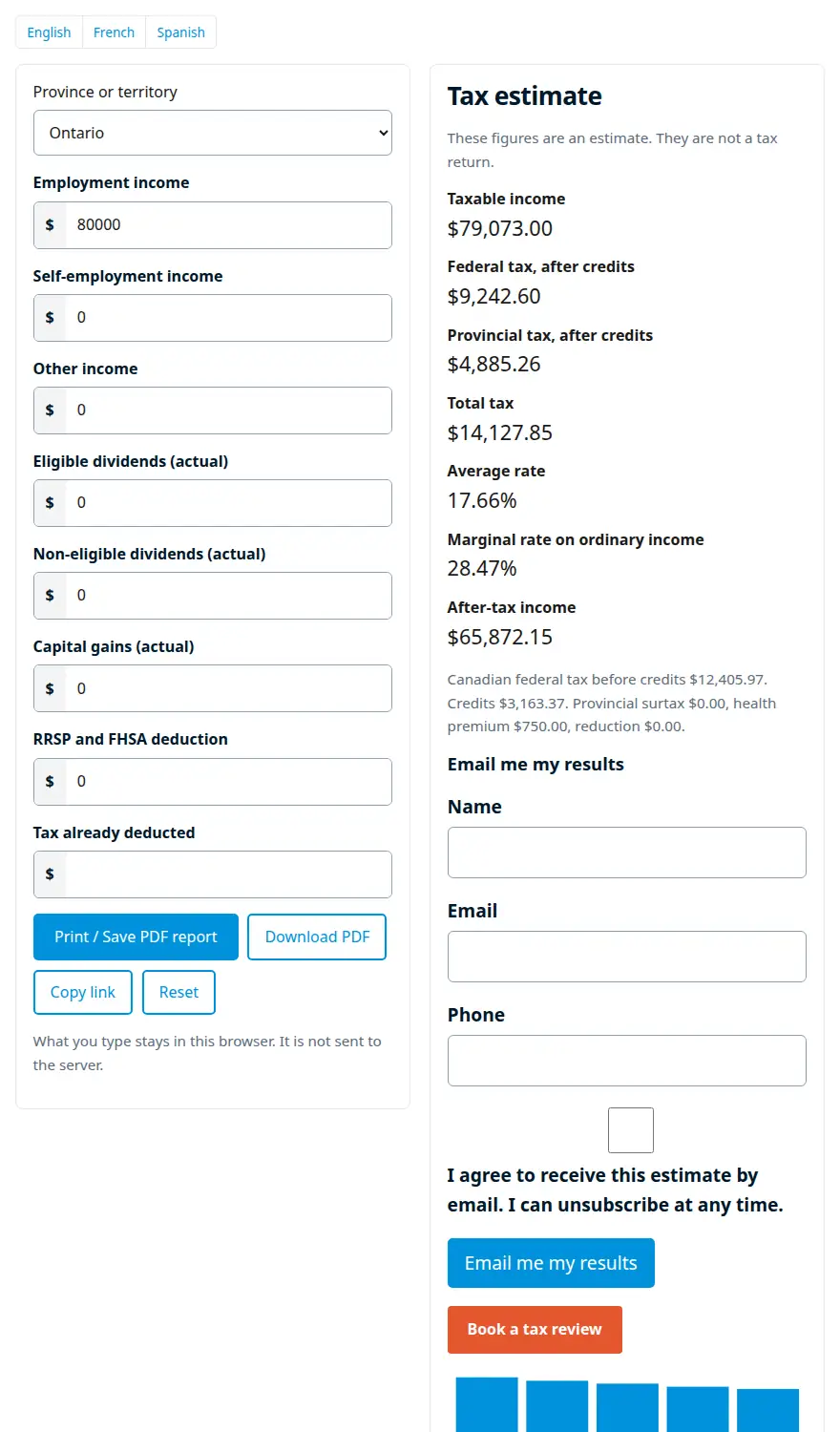
Federal tax plus one province or territory for the year in the rate file. The file shipped with Lite is the 2026 personal tax year. It does not print a paycheque.
Where it applies Alberta, British Columbia, Manitoba, New Brunswick, Newfoundland and Labrador, the Northwest Territories, Nova Scotia, Nunavut, Ontario, Prince Edward Island, Quebec, Saskatchewan, and Yukon.
What the visitor enters Place, employment income, self-employment income, other income, eligible dividends, non-eligible dividends, capital gains, one RRSP and FHSA deduction, and tax already deducted. Credits use the CPP, CPP2, and EI amounts in the file, and QPP and QPIP when the place is Quebec.
What comes back Taxable income, federal tax after credits, provincial or territorial tax after credits, total tax, average rate, marginal rate, and after-tax income. A balance appears when tax already deducted is set. Quebec also shows the workers deduction.
Sales tax
GST, HST, PST, or QST on a standard taxable amount. Rate segments in the file run from 2022 through 2026, and the date selects the segment. Vehicles, real property, and exempt supplies are not covered.
Where it applies Alberta, British Columbia, Manitoba, New Brunswick, Newfoundland and Labrador, the Northwest Territories, Nova Scotia, Nunavut, Ontario, Prince Edward Island, Quebec, Saskatchewan, and Yukon.
What the visitor enters Place, amount, date, and whether to add tax or remove it from a total.
What comes back Amount before tax, GST, PST or RST, HST, QST, tax, and the total.
Mortgage payment
A blended payment from the numbers the visitor types. The plugin does not ship a posted mortgage rate.
Where it applies Not tied to a province. Compounding defaults to the Canadian semi-annual fixed-rate convention.
What the visitor enters Price, down payment, annual interest rate, amortization in years, payments per year (monthly, biweekly, or weekly), and compounding (semi-annual or monthly).
What comes back Principal, payment, number of payments, and interest over the amortization.
Pro calculators
These ship in BOMCAS Tax & Payroll Calculators – Canada Pro, not in Lite. Payroll and take-home pay are on Professional and Agency. Personal does not include them. The other Pro tools are on every paid plan.
Payroll deductions
CPP, CPP2, EI, and income tax on a regular pay. Quebec uses QPP and QPIP where those amounts are in the payroll file.
Where it applies The 13 provinces and territories, where that tool has a rate row for the year.
What the visitor enters Province or territory, pay, and the pay frequency the payroll screen asks for.
What comes back The deductions and the net pay for that period. It is an estimate, not a source deduction.
Salary after tax
Take-home pay after tax, CPP, and EI for the year in the payroll file.
Where it applies The 13 provinces and territories, where that tool has a rate row for the year.
What the visitor enters Province or territory and salary.
What comes back Tax, payroll contributions, and the amount left.
Quebec withholding
Quebec income tax withheld on a paycheque.
Where it applies Quebec.
What the visitor enters The pay fields on that screen.
What comes back The Quebec withholding estimate.
Self-employed CPP
CPP on self-employment income.
Where it applies The 13 provinces and territories, where that tool has a rate row for the year.
What the visitor enters Province or territory and self-employment income.
What comes back The contribution estimate.
Employer health tax
Payroll tax for the provinces that have a row in the rate file. British Columbia uses a notch. Ontario phases an exemption out and then uses a rate band. Manitoba uses a notch. Newfoundland and Labrador taxes payroll above an exemption.
Where it applies British Columbia, Manitoba, Newfoundland and Labrador, and Ontario. A province that is not in the file is not estimated.
What the visitor enters Province and payroll for the years the screen lists.
What comes back The tax for the years that have a rate row.
EI benefits
A regular benefit from weekly insurable earnings, up to the maximum for the year you pick. The rate comes from the household file.
Where it applies The EI year rows in the rate file. Not a provincial benefit.
What the visitor enters Year and average weekly insurable earnings.
What comes back The regular benefit estimate.
Canada child benefit
The federal benefit for the period named in the rate file. Provincial and territorial child benefits are not added.
Where it applies Federal. Shared custody uses half of the benefit when that box is checked.
What the visitor enters Adjusted family net income, children under 6, children aged 6 to 17, and shared custody.
What comes back The federal benefit estimate.
Corporate tax
Federal and provincial tax on active business income, using the small-business and general rates in the file. Quebec small-business tax stays at zero unless you confirm the corporation already qualifies. The hours and sector tests are not calculated.
Where it applies All 13 provinces and territories have a 2026 row. Some provinces also have earlier years in the file.
What the visitor enters Province or territory, active business income, and the taxation-year start used for Quebec.
What comes back Federal tax, provincial tax, and the combined estimate.
Salary versus dividend
Compares salary with a non-eligible dividend using the gross-up and the dividend tax credits in the file. The dividend table is labelled as the 2025 tax year.
Where it applies Alberta, British Columbia, Manitoba, New Brunswick, Newfoundland and Labrador, Nova Scotia, the Northwest Territories, Nunavut, Ontario, Prince Edward Island, Saskatchewan, and Yukon. Quebec is not in that dividend table.
What the visitor enters Province or territory and the amount to compare.
What comes back The salary result and the dividend result side by side.
Capital cost allowance
CCA for the class and cost you enter. Before 2024 the first-year base is one and a half times the addition. For 2024 to 2027 the half-year rule is suspended. From 2028 it returns. Classes 54, 55, and 56 are not offered.
Where it applies Classes 8, 10, 10.1, 43, and 50. Class 10.1 uses the ceiling in the rate file.
What the visitor enters Class, cost, and the year.
What comes back The allowance for that year.
Capital gains
Tax on a capital gain. The inclusion rate is the one in the rate file, applied to the gain, then taxed with your other income and your province. A principal residence is not included.
Where it applies Federal inclusion, plus the provincial tax tables used by the income-tax estimate.
What the visitor enters Province, capital gain, and other income.
What comes back The taxable portion and the tax estimate.
Tax instalments
Whether personal instalments are required. The file uses a $3,000 threshold, or $1,800 for Quebec, and the dates 15 March, 15 June, 15 September, and 15 December.
Where it applies Personal instalments. Quebec uses the lower threshold in the file.
What the visitor enters Province and the net-tax amounts the screen asks for.
What comes back Whether instalments apply, and the quarterly dates.
CRA penalty and interest
A late-filing penalty and prescribed interest. The file includes the 2026 prescribed-rate quarters.
Where it applies The quarters present in the prescribed-rate file.
What the visitor enters Balance, due date, filing date, and payment date.
What comes back The penalty and the interest estimate.
Donations
The federal and provincial credit on a gift, using the donation rates for the province.
Where it applies The provinces present in the donation-rate table.
What the visitor enters Province, donations, and taxable income.
What comes back The credit estimate.
Car allowance
The prescribed cents-per-kilometre amount. Provinces share one pair of rates. The territories use a higher pair.
Where it applies One rate pair for the provinces and one pair for Yukon, the Northwest Territories, and Nunavut.
What the visitor enters Year, business kilometres, and whether the travel is in a territory.
What comes back The allowance amount.
Vehicle purchase
Tax on a dealer sale or a private purchase. A dealer sale uses the sales-tax rates. A private sale uses the provincial private-sale rule in the file.
Where it applies The provinces and territories that have a vehicle row. British Columbia also asks for passenger or non-passenger.
What the visitor enters Who is selling, price, province, body type where it applies, and the fee and financing fields that are shown.
What comes back The tax and the amount due.
Lease or buy
Compares leasing a vehicle with buying it from the payments, term, and tax you enter.
Where it applies Uses the sales-tax rates for the province you pick. It is not a lender quote.
What the visitor enters Province and the lease and purchase fields on the screen.
What comes back The two totals side by side.
Mortgage stress-test payment
The stress-test payment and the common debt-service limits from the income, debts, price, and rate you type. It does not approve a mortgage.
Where it applies Not a provincial tax. The qualifying rate is the one you type or the floor in the rate file, whichever the screen uses.
What the visitor enters Income, debts, price, down payment, and rate.
What comes back The stress-test payment and the debt-service ratios.
CMHC insurance
The mortgage insurance premium from the down payment, using the premium bands in the rate file, including the homebuyer band when that box applies.
Where it applies The premium table in the file. It is not a CMHC approval.
What the visitor enters Price, down payment, and whether the homebuyer band applies.
What comes back The premium and the insured mortgage.
Land transfer tax
Property transfer tax. British Columbia and Ontario use the brackets in the file. Toronto adds the municipal tax when that box is checked. Manitoba, New Brunswick, Nova Scotia, and Prince Edward Island use a rate you type. Quebec uses brackets you type. If those boxes are blank, no tax is shown.
Where it applies British Columbia and Ontario have built-in brackets. The other provinces named above need a rate you supply. A province with no rule is not estimated.
What the visitor enters Price or value, registration date, first-time buyer, and the province boxes that appear: residential value over $3 million in British Columbia, single-family and Toronto in Ontario, a typed rate in Manitoba, New Brunswick, Nova Scotia, and Prince Edward Island, or typed brackets in Quebec.
What comes back The transfer tax.
RRSP room
Room from last year’s earned income and the dollar limit in the rate file, minus a pension adjustment you type. Other adjustments on a notice of assessment are not included.
Where it applies The RRSP rate and dollar limit in the household file.
What the visitor enters Year, earned income last year, and pension adjustment.
What comes back The deduction limit from those inputs.
TFSA room
Adds the annual limits for the years you choose, then adds last year’s withdrawals and subtracts this year’s contributions.
Where it applies The annual limits in the household file.
What the visitor enters First year, last year, withdrawals last year, and contributions already made this year.
What comes back The room from those years and amounts.
FHSA
How much you can still put in a first home savings account. The first year uses the annual amount in the file. Later years can include unused room up to that same annual amount, and the lifetime limit in the file caps the total.
Where it applies The FHSA amounts in the household file.
What the visitor enters Whether this is the year the account was opened, unused room from last year, and the amount already contributed this year.
What comes back The room still available.
Old Age Security
The recovery tax when income is above the threshold in the rate file. The repayment is capped at the pension you enter.
Where it applies The OAS threshold for the year you pick.
What the visitor enters Year, net income, and OAS pension received.
What comes back The recovery tax.
Quebec welcome tax
The municipal welcome tax on a Quebec property transfer, from the brackets in the household file.
Where it applies Quebec.
What the visitor enters Year, price in the deed, and municipal market value if it is higher.
What comes back The welcome tax.
Block and shortcode
Block
In the editor, insert BOMCAS Tax & Payroll Calculators – Canada. The calculator attribute is income tax, sales tax, or a mortgage payment. Province is optional.
Shortcode
[bomcas_calculator id="income-tax" province="ON"][bomcas_calculator id="sales-tax" province="BC"][bomcas_calculator id="mortgage-payment"][bomcas_calculator_pro id="payroll-deductions" province="ON"]
Example pages
- An Ontario income-tax page, with a note that the result is an estimate and a link to book a review.
- A shop page that adds or removes GST, HST, PST, or QST for the province you set.
- A home-buyer page with the mortgage payment, and Pro land transfer tax for British Columbia or Ontario.
- A recruiting page with Pro take-home pay under a salary band. That calculator is not in Lite or on Personal.
What you manage in wp-admin
Overview
The Calculators menu opens on a summary of the tools that are on.
Settings
The credit line under a result stays off until you save it. Nothing is sent to Google unless you save a measurement id.
Toggles
Turn Canada off, or turn off one Lite calculator. A hidden tool leaves shortcodes and the sitemap.
Rates
Export or import the year file. Canada is the country on this screen.
Account and upgrade
Plans, prices, and active coupons load from the store. Buy opens Stripe only after you agree to send the site address and email.
Pro licence
Paste the key, see the plan, the renewal date, and the sites, and open My Account for invoices and cancellation.
Plans and prices
Lite is free. The cards are the catalogue on this store, in Canadian dollars. Personal does not include payroll. Payroll and take-home pay start on Professional.
There are currently no promotions available.
Personal
$19.00 CAD per month
- 1 WordPress site
- Pro calculators beyond Lite: corporate tax, savings room, vehicle and property tools, and a five-year rate comparison
- Payroll, take-home pay, Quebec withholding, and employer health tax are not included
- Updates and support while the subscription is active
- Quarterly $49.00 CAD
- Yearly $149.00 CAD
Recommended
Professional
$39.00 CAD per month
- 5 WordPress sites
- Payroll, take-home pay, and the other Pro tools
- White-label on a client site
- Updates and support while the subscription is active
- Quarterly $99.00 CAD
- Yearly $299.00 CAD
Agency
$79.00 CAD per month
- 25 WordPress sites
- Every Pro calculator, including payroll and take-home pay
- White-label on a client site
- Updates and support while the subscription is active
- Quarterly $199.00 CAD
- Yearly $599.00 CAD
Cancel renewal any time. Unused time in a period you already paid for is not refunded, except where the law requires it.
Privacy
The estimate is calculated in the browser. Typed amounts are not sent to Accountants Expert for that calculation. Your site stores a view count. Email, PDF, and Google Analytics run only if you turn them on, and email or PDF only after the visitor submits.
A licence key, if you use Pro, is stored on the customer site and checked against the store. The store keeps the customer email, plan, status, and sites for the subscription. Card numbers stay at Stripe.
Licensing, sites, renewal, and cancellation
Sites
Personal covers 1 site, Professional 5, and Agency 25. Activating or removing this site is done from My Account. Lite does not use a site count.
Renewal
The renewal date is on the Pro screen and in My Account. Stripe charges the monthly, quarterly, or yearly amount for the next period unless you cancel first.
Cancellation
Cancel renewal from My Account. The next invoice is not charged. Access, updates, and support continue until the end of the period you already paid, then the licence ends. Unused time is not refunded, except where the law requires it. The GPL code already on the site keeps running.
Upgrading from inside the plugin
- 1
Open Account and upgrade
In wp-admin, under Calculators. The screen is not shown to visitors.
- 2
Check the consent box
Buy sends this site’s address and the receipt email only after you check it.
- 3
Pay on Stripe
Checkout uses the plan and period you chose, and a coupon if one applies. You return to the plugin.
- 4
Upload Pro yourself
Download the zip from My Account and upload it under Plugins, Add New. Paste the key into Pro.
Themes and page builders
Lite requires WordPress 6.2 and PHP 7.4. Pro requires WordPress 6.5 and PHP 7.4. The calculator does not take over the theme. Use the block in a block theme, or the shortcode in a classic theme.
Elementor, Beaver Builder, Divi, and other builders work when they can output a WordPress block or a shortcode. If the block is not in the builder’s list, use its shortcode element and paste the calculator shortcode. The form uses the plugin’s own stylesheet, so it stays readable on a dark or a light theme.
On Multisite, activate the plugin on each site that should show a calculator. A Pro plan counts each site address you add to the licence.
Questions
Does this file a return?
No. The figures are estimates. They are not a filing, a ruling, or a Canada Revenue Agency service. The plugin does not prepare a T1, a T2, a T4, or a remittance.
Where do the typed numbers go?
The arithmetic runs in the browser. The form is not posted for the calculation. A view count is stored on your own WordPress site. An email, a PDF, or a Google event is sent only after you turn that option on and, for email or PDF, the visitor submits it.
Which tax year does income tax use?
The newest year in the personal tax file whose start date is today or earlier. The file shipped with Lite is the 2026 personal tax year. A later file, imported under Calculators, Rates, is used on the next page view. Sales-tax segments in the file run from 2022 through 2026, and the date the visitor picks selects the segment.
Which places are covered?
Canadian income tax and sales tax cover the federal tables and all 13 provinces and territories. Some Pro tools cover fewer places, and those limits are named on each calculator.
Does Lite include Canadian payroll?
No. Canadian payroll deductions and salary after tax start on the Professional plan. Personal does not include them. Lite income tax does use the CPP, CPP2, EI, QPP, and QPIP amounts from the rate file when it works out credits. It does not show a paycheque.
What do the Pro plans cover?
Personal is one site, Professional is five sites, and Agency is twenty-five sites. Prices are in Canadian dollars on the pricing page. The licence is for updates and support while it is active or in grace. The GPL code you already installed keeps running if the subscription ends.
How do I put a calculator on a page?
Add the BOMCAS Tax & Payroll Calculators – Canada block, or the shortcode [bomcas_calculator id="income-tax" province="ON"]. Pro tools use [bomcas_calculator_pro id="payroll-deductions" province="ON"]. The province code is optional. Income tax and sales tax default to British Columbia.
Which WordPress version does it need?
Lite requires WordPress 6.2 or newer. Pro requires WordPress 6.5 or newer, because it declares Lite as a required plugin. Both require PHP 7.4 or newer.
Does it work with my theme?
Yes. The calculator is a block and a shortcode. It does not replace your theme, your header, or your styles outside its own form. It has been checked on the Accountants Expert theme and on a default block theme.
Does it work in the block editor?
Yes. Search the block inserter for BOMCAS Tax & Payroll Calculators – Canada. Choose income tax, sales tax, or a mortgage payment, and optionally a province. Payroll blocks are not in Lite.
Can I use a shortcode instead of a block?
Yes. Paste [bomcas_calculator id="sales-tax" province="BC"] into a shortcode block or the classic editor. The ids in Lite are income-tax, sales-tax, and mortgage-payment.
Does it work with Elementor, Beaver Builder, or another page builder?
Yes, where the builder can place a WordPress block or a shortcode. Use the builder’s shortcode widget if it does not list the block. The calculation still runs in the visitor’s browser.
Does it work on WordPress Multisite?
Yes. Activate it on the sites that should show a calculator. A Pro licence counts each site address you activate. Network activation is supported. Each site still needs its own activation on the licence if you use Pro updates.
How accurate are the numbers?
They follow the rate file shipped with the plugin, or a file you import later. Income tax uses federal and provincial brackets, basic personal amounts, and the CPP, CPP2, EI, QPP, and QPIP amounts in that file. They are estimates for a conversation, not a assessed return.
How do rate updates work?
Lite ships the rates in the plugin. A new tax year arrives when you update the plugin from WordPress.org. You can also import a file under Calculators, Rates. A remote download stays off until you opt in on that screen, and it sends no calculator inputs. Pro, with a saved licence key, checks accountantsexpert.com once a day. A failed signature or checksum leaves the bundled rates in place.
Can I replace a rate myself?
Yes. Calculators, Rates exports the current file and imports a replacement. An override you saved stays in place if a later file touches the same value, and the screen tells you when that happens.
Does it send calculator inputs to Google?
No, unless you save a Google measurement id. With that field empty, nothing is sent to Google. The arithmetic does not leave the browser.
What about email and PDF?
Both stay off until you enable them. A visitor has to submit the form before an email is sent or a PDF is requested. The calculation itself is not that submission.
What does the site store?
A view count on your own site. Leads, if you turn the form on, are stored in your database and can be deleted on a schedule you set. Calculator inputs used only for the estimate are not posted to Accountants Expert.
What does Lite include?
Three calculators: Canadian income tax, GST, HST, PST and QST, and a mortgage payment. The styling shipped with the plugin. The rate file in the zip. Lite does not include payroll, corporate, savings, or property tools, white-label, a site-count licence, or a Pro download.
Is Lite a trial that locks features?
No. Lite is the free plugin. Pro tools are not hidden inside it. Limits are the tools Lite simply does not include. Upgrade prompts appear in wp-admin only, and a visitor never sees them.
How do I upgrade from inside the plugin?
Open Calculators, Account and upgrade. Plans and any active coupon come from the store. Buy sends this site address and the receipt email only after you check the consent box, then opens Stripe Checkout and returns to the plugin.
Will Lite install Pro for me?
No. After you buy, open My Account on accountantsexpert.com, download the Pro zip, and upload it under Plugins, Add New. Paste the licence key into Pro.
How many sites does a plan cover?
Personal is 1 site, Professional is 5, and Agency is 25. Lite itself is not limited by a site-count licence. The count applies to Pro updates and support.
How do I activate or remove a site?
Pro shows the sites on the licence. My Account on accountantsexpert.com is where you activate or deactivate this site, see invoices, and change the plan. The plugin stores the licence key locally and does not print it back.
When does a plan renew?
On the renewal date shown in Pro and in My Account. Monthly, quarterly, and yearly prices are the amounts Stripe charges for that period. You can turn renewal off. Access continues until the period you already paid for ends.
Can I cancel, and is unused time refunded?
You can cancel renewal at any time from My Account. Cancellation stops the next charge. Unused time in a period you already paid for is not refunded, except where the law requires it.
Do coupons work?
Yes, when the store has an active coupon. The upgrade screen and the pricing page list coupons that have banner text and are still inside their dates and redemption cap. An empty list means there is no public promotion. You can still type a code at checkout.
What does support cover?
Pro support and updates run while the licence is active or in grace. Lite is the free plugin. Support for a paid plan is from the store, at the address in My Account. The calculators keep running if a subscription lapses. A lapsed licence pauses updates and support. It does not switch the installed code off.
What is white-label?
Professional and Agency can hide the licence key, plan, and upgrade screens from users who are not on an allow list. Personal does not include white-label. Lite does not include it.
Which languages ship with Lite?
English, French (Canada), and Spanish. The calculators use the language of the WordPress site when a translation is installed.
Does the form fit a phone?
Yes. The calculator form fits a narrow screen. The gallery includes an income-tax view at phone width. That is the layout that was checked, not a separate mobile app.
Where do I paste the licence key?
In Pro, on the licence screen. Leave the licence server empty on the store itself. On a customer site, set it to https://accountantsexpert.com. The key is saved on that site and is not shown in the page source afterwards.
What happens if I do not enter a licence?
Pro calculators still run. Updates and support stay paused until the licence is active or in grace. Lite never asks for a key.
How do I pay?
Stripe Checkout. You can pay by card, and by Apple Pay or Google Pay where Stripe offers them. Accountants Expert does not store card numbers. Prices are in Canadian dollars.
How does Quebec work?
Income tax includes the federal abatement and the Quebec workers deduction. Sales tax can show QST. Payroll tools, on Professional and Agency, use RRQ, RQAP, and the Quebec withholding table where that calculator has a row. The salary-versus-dividend table does not include Quebec.
Does land transfer tax include Toronto?
Land transfer tax is a Pro tool. British Columbia and Ontario use the brackets in the file. A Toronto checkbox adds the municipal tax. Manitoba, New Brunswick, Nova Scotia, and Prince Edward Island use a rate you type. Quebec uses brackets you type. A blank rate means no tax is added.
Is this affiliated with the CRA?
No. BOMCAS Canada builds the plugin. It is not the Canada Revenue Agency, and it is not a tax filing service.
Who makes it?
BOMCAS Canada, owned by Dellendo Farquharson. The product name is BOMCAS Tax & Payroll Calculators – Canada. The store is accountantsexpert.com.
Put BOMCAS Tax & Payroll Calculators – Canada on a site
Lite is the free plugin. Pro is a separate plugin you upload after you buy. Canadian-built by BOMCAS Canada. bomcas.ca